Legal Document Generator
Describe the agreement you need in plain English and get a filled-in, ready-to-review contract as a PDF.
Legal Document Generator is a full-stack web app for drafting common business agreements. Instead of filling in a long form, you chat with an AI assistant. It works out which agreement you need, asks for the details, and fills in the document while you watch. When you're done, you can download a formatted PDF or save the draft to come back to later.
The problem it solves
Startups and small teams sign the same agreements again and again: NDAs, cloud service agreements, data processing agreements, pilots. Standard templates exist, but turning them into a finished document still means reading the clauses, working out which fields matter and filling them in correctly. This app turns that into a short conversation and shows the finished document live as you go.
Key features
- Conversational drafting. An AI chat picks the right document from what you describe and fills in its fields from your answers.
- Honest scope. If you ask for something it doesn't support, such as an employment contract or a lease, it says so and suggests the closest supported document. It only switches once you agree.
- Live preview. The document updates as you chat, with a generated cover page and highlighted defined terms. You can also pick the document or edit it by hand.
- PDF export. PDFs are generated in the browser, with a disclaimer at the foot of every page.
- Accounts and saved drafts. Sign up, sign in and save a draft (the document, its field values and the chat). Drafts are listed under "My documents", where you can reopen or delete them.
- Responsible by design. Every document is clearly marked as a draft that needs legal review: in the editor, in the app footer and in the PDF.
Architecture and tech stack
The product is meant to feel like one tool, not a pile of systems. You chat and review the document in your browser. Behind the scenes, a single application handles sign-in, the conversation, and saved drafts. The AI is called in only when it's needed: to interpret what you asked for and fill in the agreement.
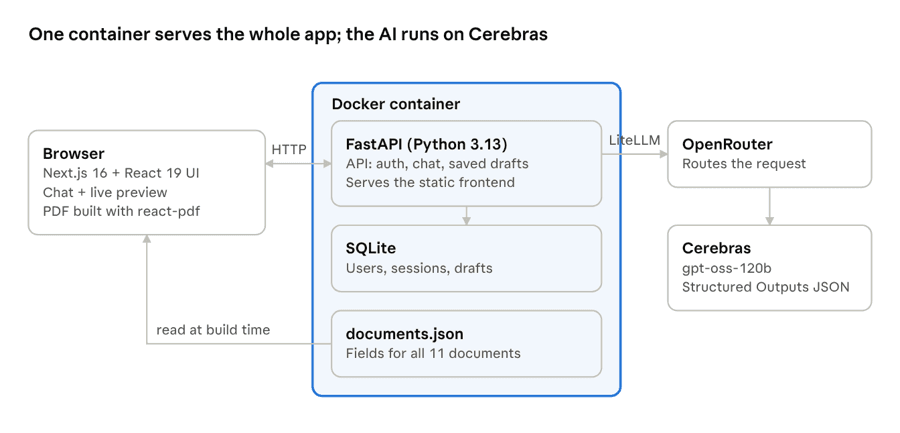
In plain terms: you work in the browser, one application holds the drafts, and the AI is used only to fill in the agreement.
Every agreement uses the same underlying playbook — the parties, the fields, and the standard language. That's why the live preview, the PDF, and the chat all stay in sync. Adding another agreement is a matter of updating that playbook, not starting from scratch.
- What you use. A chat in the browser, a document that fills in as you go, and a PDF you can download when you're done.
- What holds it together. One application stores sign-in, conversations, and saved drafts, so there isn't a separate system for each piece.
- What the AI does. It reads your request, picks a supported agreement, and fills in the fields. It will not silently invent a contract type you didn't ask for.
- What you walk away with. A formatted draft that's clearly marked for legal review — in the editor, in the footer, and on every page of the PDF.
The legal templates are adapted from Common Paper's open standard agreements.
This app produces drafts for review. It is not legal advice.
← Back to portfolio